Trading Bot: What It Is and How Beginners Can Choose One

Trading bot: what it is and how beginners can choose one. Here’s a plain-English guide to the difference between signal bots and automated solutions, where results most often “break,” and how to filter out sketchy services in 5 minutes.
A trading bot is a tool that helps you trade by rules: it either sends signals or partially/fully automates actions on a platform. One important point: a bot doesn’t “make profit” — it only executes logic. If the logic is weak, the bot will make the same mistakes faster and more consistently.
What should you understand before you start?
- Signals are usually the best entry point for beginners: easier to control and fewer technical risks.
- Before you start, check 3 things: risk limits, API security, and costs (fees/slippage).
- If someone promises “guaranteed income,” it’s almost always a red flag.
Video: how I trade using bot signals
How a trading bot works (in plain English)
Any bot does the same four steps:
- gets data (quotes, indicators, sometimes volume);
- applies rules (a strategy);
- outputs a decision (a signal or an action);
- records results (history, report, notifications).
If a bot is connected to an exchange/platform via API, it can place trades automatically. If it’s not connected, it simply sends signals — and the decision and execution stay on you.
What types of trading bots are there?
By format: signals vs automation
Signal bot — sends the decision (for example: asset + direction + time).
- Pros: simpler and safer to start, fewer “failure points.”
- Cons: you still need to execute and stay disciplined.
Automated bot — places trades/orders itself (fully or partially).
- Pros: less routine, you can trade on a schedule.
- Cons: higher risk of mistakes (settings, API, lags, wrong limits).
By strategy: what you’ll see most often
- Grid — tries to capture moves inside a range.
- DCA — averages in/out in steps, changing the average price.
- Arbitrage — targets price differences between venues/markets.
- Rules/indicators — entries/exits by conditions (EMA/RSI/MACD/ATR, etc.).
- Signal scenarios — no “auto trades,” only decisions and alerts.
Risks and limits: what matters upfront
Trading is risk — and automation amplifies both good and bad decisions. Here are the most common beginner issues and what to do about them:
-
Fees and slippage eat performance → if you trade often, calculate costs in advance.
*In binary options, there is usually no separate commission per trade, but platform terms still apply and the outcome risk remains. - Sharp moves and news can break “pretty settings” → use stop rules and a daily loss cap.
- Markets change → what worked before may stop working. Test and keep common sense.
- Legal restrictions depend on your country and the platform. Some instruments (including binary options) often have 18+ restrictions and specific rules.
If you need a solid base on risk constraints, check the risk & psychology section, and for a clean start from zero — the step-by-step beginner guide.
Security: how to connect a bot without taking extra risk
If a bot connects to a platform via API, security must come first.
Mini checklist for safe connection:
- enable 2FA on your account;
- create a separate API key;
- permissions: read/trade;
- withdraw — disable;
- if possible, restrict by IP;
- store keys securely (not in notes or screenshots).
Red flags for “scam bots”:
- “give withdrawal access or it won’t work”;
- “profit guarantee”;
- “secret strategy, we won’t explain anything”;
- pressure like “pay right now”;
- no clear limits or risk settings.
Need help connecting?
If you run into issues connecting our trading bots (free for portal readers), message me on Telegram — I’ll help you set it up and show you where the risk limits are.
How to choose a trading bot: checklist + a “5-minute” verification
Below are the criteria that actually matter. The idea is simple: don’t trust claims — verify with your own eyes.
Table: how to check a bot is legit
| Criterion | How to check in 5 minutes |
|---|---|
| Format (signals/auto) | you can tell from the interface and description: alerts or automated actions |
| Risk limits | is there a daily loss cap, limits on trades/positions, stop rules |
| Logic transparency | are conditions/filters clear, or is everything “magic AI” |
| Reports/history | is there a log of trades/signals, export/stats |
| Fees and pricing | clear pricing, no “hidden terms” |
| Demo/paper | can you test without risk |
| Support | FAQ/instructions/fast responses |
| Reputation | reviews, recent updates, public team/author |
Bot economics: why “everything seems right” but there’s no money
Even a good algorithm can underperform if costs eat the edge — especially with frequent trades.
Mini cost calculator (fill it in for yourself)
| Parameter | Value |
|---|---|
| Subscription/service per month | — |
| Average platform fee | — |
| Trades per day | — |
| Estimated cost per trade (fee/slippage) | — |
| Estimated monthly costs | — |
If you see costs “eating everything,” simplify the approach: fewer trades, clearer scenarios, strict limits. For practical execution, I recommend the strategies & practice section.
How beginners can start without chaos (step by step)
- Pick 1 market and 1–2 assets you actually understand.
- Decide what fits you: signals (easier) or automation (harder).
-
Start with testing: a demo account or minimal size.
For example, on Binarium you can practice on demo, and on first registration use promo code TREND for a deposit bonus. - Set risk constraints: daily loss cap, trade/position limits, a stop rule.
- Keep a journal: what was planned, what went wrong, and why.
Example: our AI bot (24/7) for binary options and a signal format
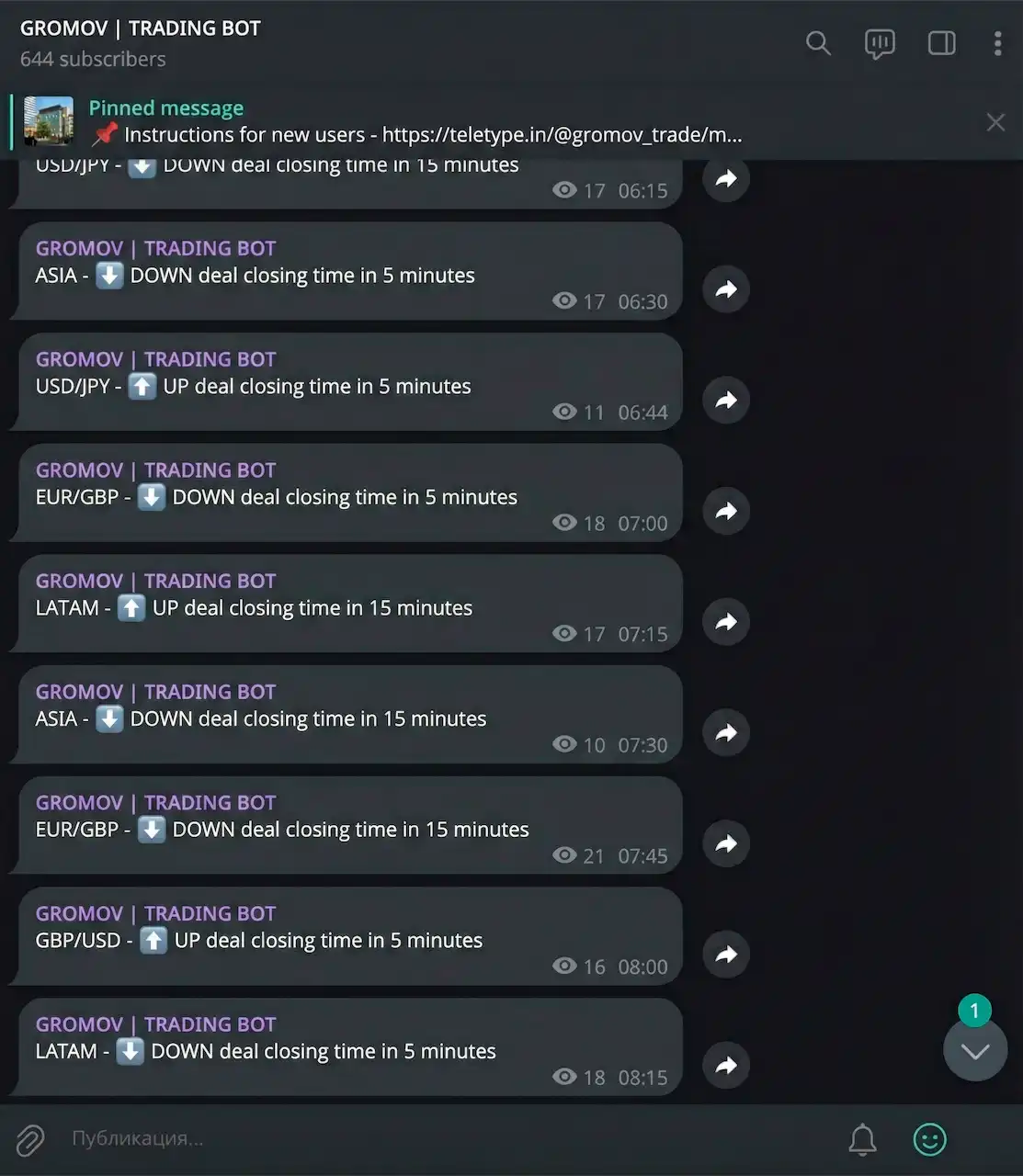
We built an AI bot that runs 24/7 and sends Telegram signals in a simple, beginner-friendly format:
- asset (for example, BTC, EUR/GBP, GBP/USD);
- direction (up/down);
- expiry time (often 5 or 15 minutes).
Want to test the signals in real conditions?
Register on Binarium and use promo code TREND — you’ll get a first-deposit bonus and can trade together with the community.
What the bot does (and what it doesn’t)
What it does:
- analyzes the market using a set of rules and filters;
- tries to filter out “low-quality” situations;
- sends a signal in a clear format;
- runs 24/7 and pushes notifications.
What it doesn’t do:
- does not guarantee profit;
- does not remove risk;
- doesn’t “predict the market every time”;
- doesn’t replace risk management and common sense.
Important: binary options are a high-risk instrument. Use only approaches you understand, and follow age restrictions and the rules of your country/platform.
Common beginner mistakes with bots
- Too many trades → limit the number of signals/trades per day.
- No loss cap → set a daily stop and stick to it.
- Changing settings after a couple of losses → test over a meaningful sample and keep a journal.
- Ignoring costs → calculate costs before you start (see the table above).
- Blindly trusting “AI” → demand transparency: what the bot does, what filters it uses, what limits are set.
FAQ
1) Is a trading bot guaranteed profit?
No. A bot is a rule executor. It helps with discipline and speed, but it doesn’t remove risk or changing market conditions.
2) What’s better for beginners: signals or automation?
Usually signals: you control execution, it’s easier to understand mistakes, and there are fewer technical risks.
3) How safe is connecting a bot via API?
It’s safe only with the right permissions: read/trade and strictly without withdraw. Any request for withdrawal access is a hard stop.
4) Why can a backtest look great but perform worse in real trading?
Real trading includes costs, slippage, delays, and news. A backtest is idea validation, not a result guarantee.
5) Which risk settings matter most?
A daily loss cap, limits on positions/trades, and a clear rule to stop trading during drawdowns.
6) How do you know a bot isn’t for you?
If you don’t understand its logic, can’t explain where the risk limits are, and don’t keep a journal — you’re basically trading blind.
Bottom line
A trading bot can be a useful tool if you approach it realistically: understand the format (signals vs automation), set risk limits, calculate costs, and don’t believe “guarantees.” Start simple, test, and only then add complexity.
To go deeper into tools and execution, visit Tools & Platforms, and if you’re choosing a platform, check Choosing a Broker.
Ready to put this into practice?
Fund your Binarium account and use promo code TREND to get a +100% bonus and test the approach.