How to Withdraw Money from Binarium: to a Card, Wallet, or Crypto

Promo code: TREND (+100% on your first deposit)
Withdrawing funds from Binarium is not complicated, but beginners often have questions: which method to choose, whether verification is required, and why a request may be rejected. In this article, we break down the entire process step by step — from the first withdrawal request to receiving funds on a bank card, e-wallet, or crypto wallet. Methods, limits, fees, and timeframes may change, so always check the current terms in the Binarium cashier at the moment you submit your request.
Quick answer: how to withdraw money from Binarium in 2 minutes
- Log in to your Binarium account. If you run into issues, see the step-by-step guide: Binarium login.
- Open Cashier / Deposit / Withdrawal.
- Choose a method — card, wallet, or crypto — depending on what is available in your cashier.
- Enter the amount and payment details, then confirm the request.
- Check the status in your transaction history.
If the withdrawal does not go through, in most cases the reason comes down to one of three things: incomplete verification, a mismatch between the deposit and withdrawal methods, or active bonus conditions. Below, we will break down each scenario separately.
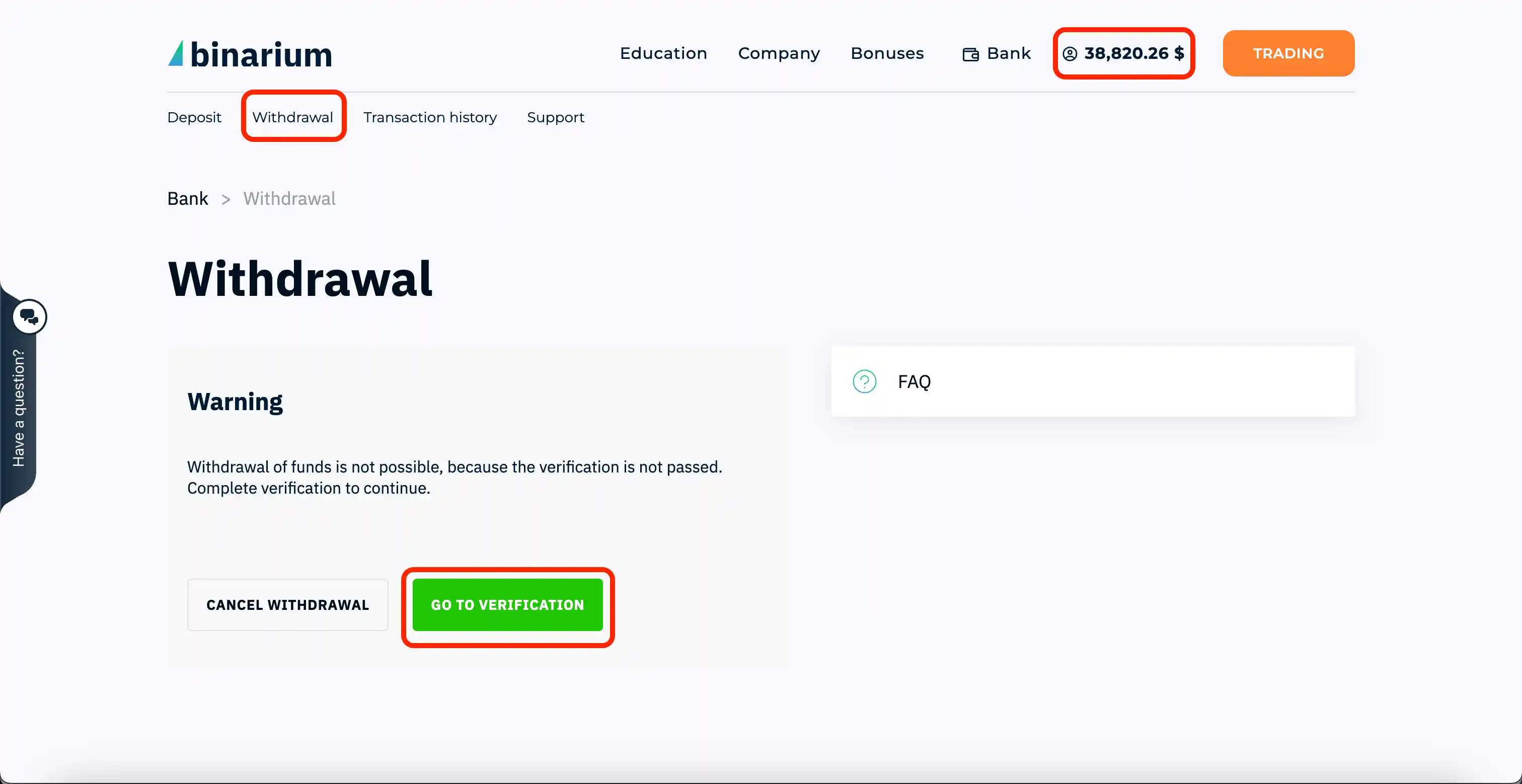
What to check before withdrawing
Before submitting a withdrawal request, run through this checklist:
- You are logged into the correct account (email/login).
- You have access to your email or phone for confirmations.
- Verification is completed, or at least your documents have been submitted. More details: Binarium verification guide.
- You are withdrawing with the same method you used to deposit — this is a common anti-fraud requirement.
- If a bonus or promo code is active, you understand the terms and possible restrictions. More details: Binarium promo code and what to watch out for. By the way, if you register via Binarium using the TREND promo code, you get +100% on your first deposit.
- Your withdrawal details are filled in without mistakes.
- You checked the limits, fees, and processing times in the cashier for the selected method before confirming — that is usually where the platform shows prompts and restrictions for your account.
Withdrawal methods and what usually gets in the way
Below is a quick comparison table of the main withdrawal methods and the most common problems that can arise with each one.
| Method | Common issue | What to do |
|---|---|---|
| Bank card | Does not match the deposit card; card is blocked or expired | Withdraw to the same card and check the expiry date |
| E-wallet | Incorrect details, or it does not match the deposit method | Double-check the details and use the same wallet |
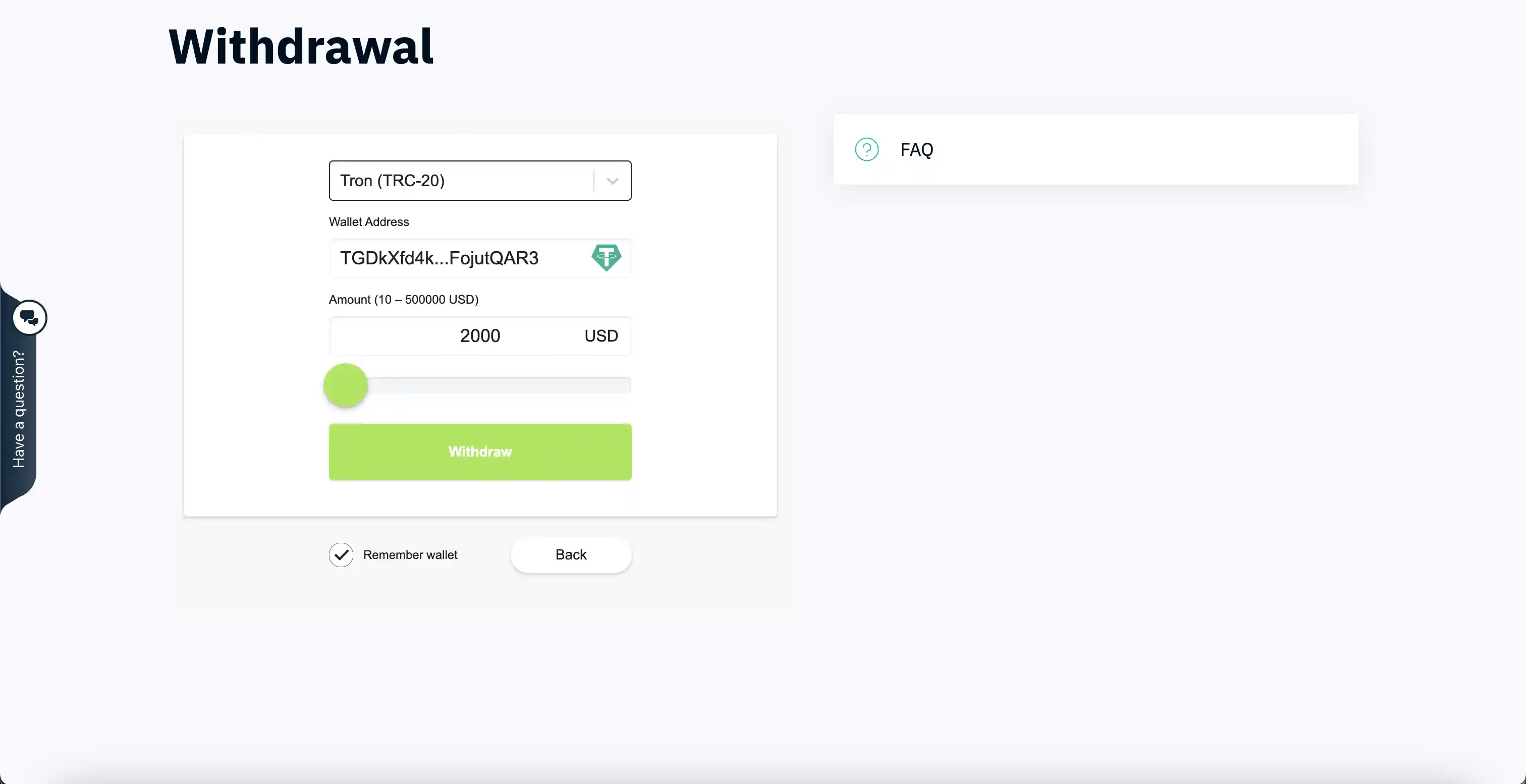
| Cryptocurrency | Wrong network or a mistake in the wallet address | Check the address twice (first and last characters) and make sure the network is correct |
Step-by-step guide: withdrawing funds in your account
Let’s walk through the basic Binarium withdrawal process step by step.
Step 1. Log in to your account
Sign in to your account. If you cannot log in, use this separate guide: how to log in to Binarium.
Step 2. Open “Cashier / Withdrawal”
The section you need is usually called Cashier / Deposit / Withdrawal / Finance. This is also where you will often see notes about the restrictions of the selected method — pay attention to them before confirming.
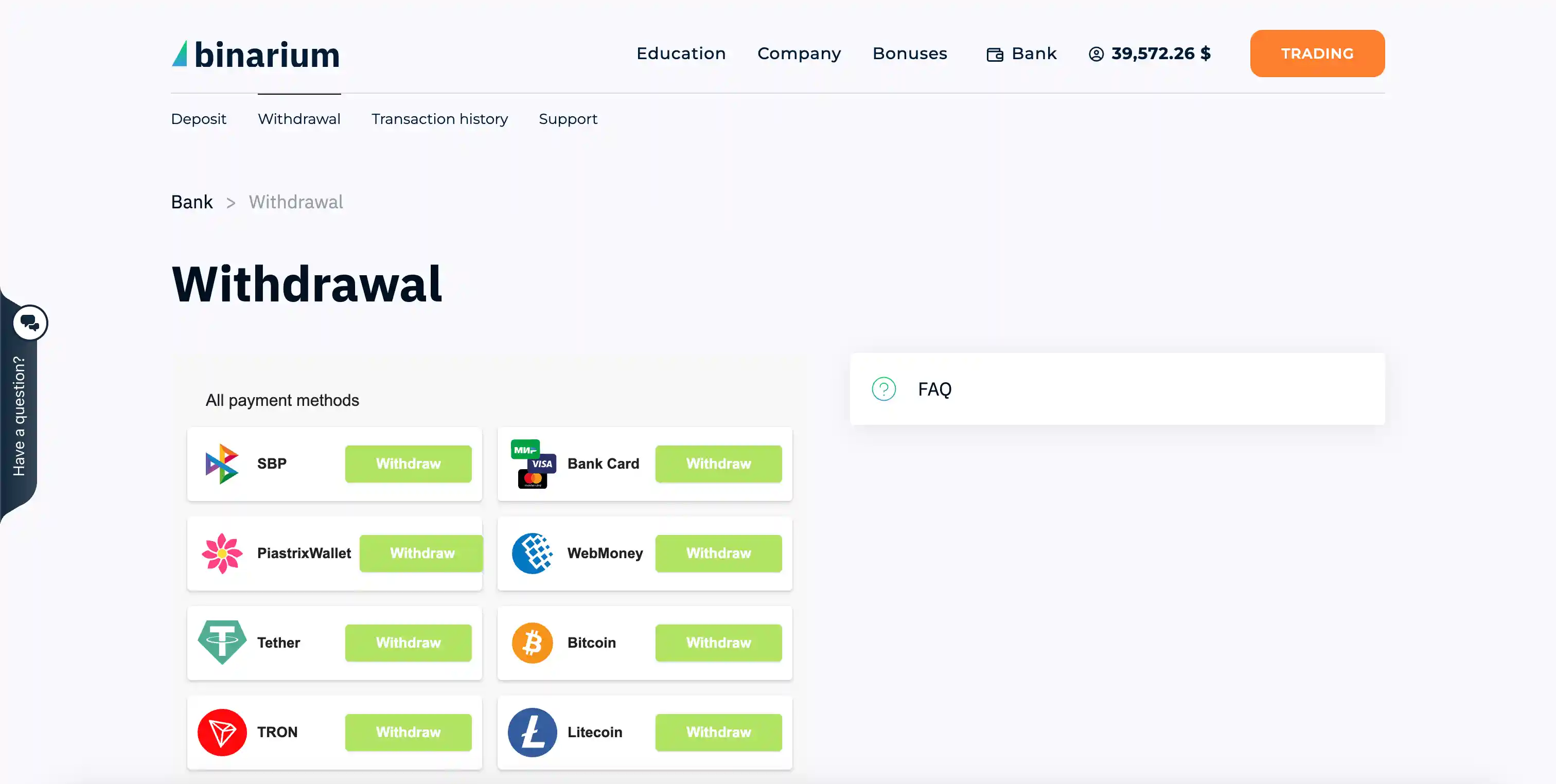
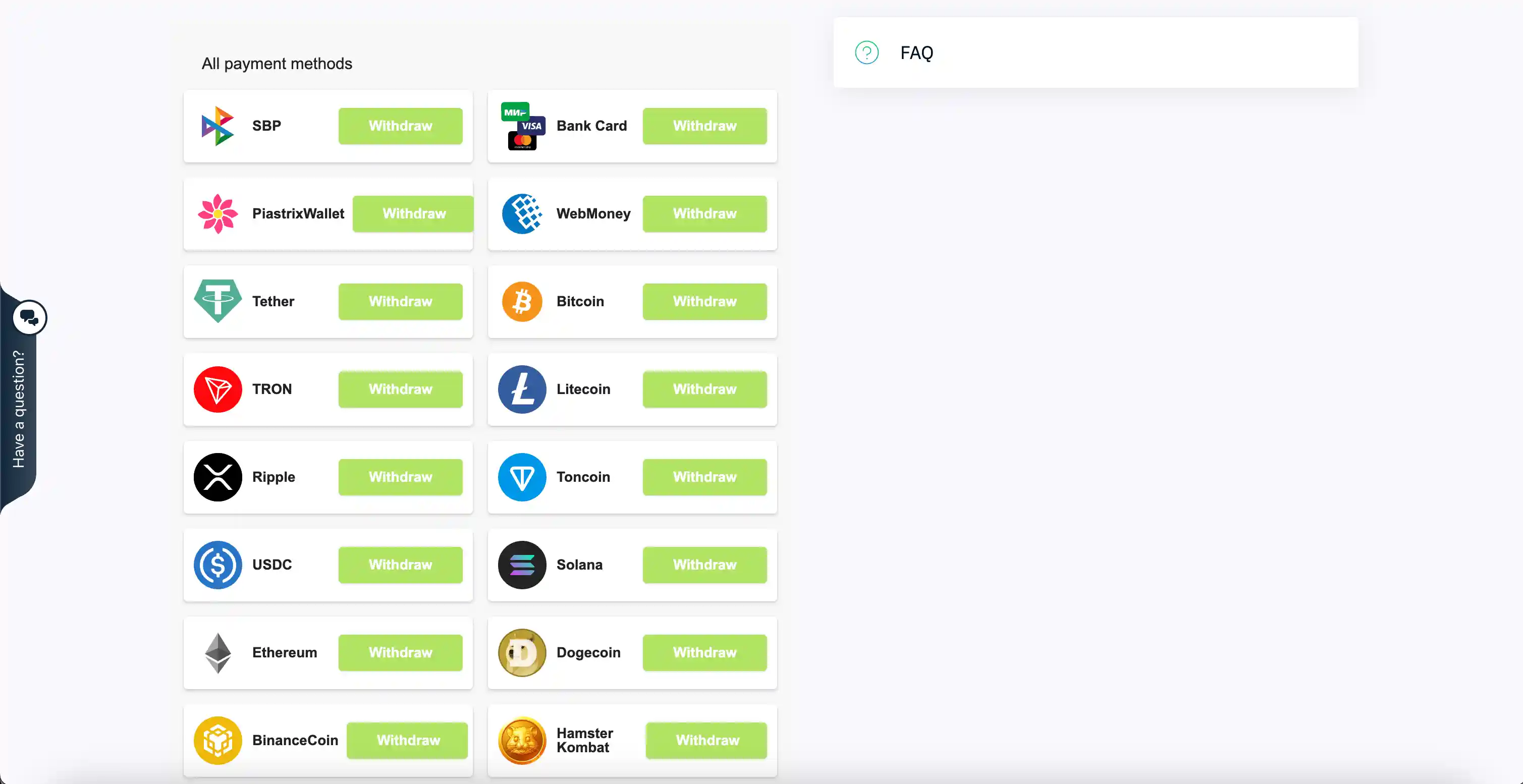
Step 3. Choose a withdrawal method
Select one of the available options — card, wallet, or crypto. The list of methods may vary depending on your region and deposit history, so focus on what you actually see in your cashier.
Step 4. Enter the amount and payment details
Fill in the details carefully. Before confirming, double-check that the amount is correct, there are no typos in the payment details, the right method is selected, and you understand the restrictions and limits shown in the cashier.
Step 5. Confirm the request and check the status
After confirming, go to your operations / transaction history and track the status of your request there.
How to withdraw money from Binarium to a card
Withdrawal to a bank card is the most common request among platform users, so let’s look at this scenario separately.
Mini checklist for card withdrawals
Before submitting your request, make sure that:
- The card is yours and active.
- You deposited with the same card (if the platform requires matching methods).
- The payment details are entered without mistakes.
- Verification is completed or currently in progress.
- You are tracking the request status in the transaction history.
If the card has changed or is no longer active
Do not try to guess a new method. First, check how you deposited, then see which withdrawal methods are available in the cashier. If you need to change the payment details, contact support with the full information — there is a message template below.
Withdrawals to e-wallets and cryptocurrency
If you are not withdrawing to a card but to a wallet or crypto address, the most common beginner mistake is entering the wrong details or choosing the wrong network.
Before confirming (especially for crypto)
- Check the address twice — compare the first and last 4–6 characters.
- Make sure the network/type matches your wallet.
- Do not take an address from chats or copy it from suspicious websites.
This is the most expensive kind of mistake: sending cryptocurrency to the wrong address or the wrong network is usually irreversible. It is always better to stop and double-check than to lose funds.
Fees, limits, and processing times
The main rule is simple: do not rely on someone else’s numbers — check the current terms in your own account.
Where to find the exact details
- In the cashier for the selected method before confirming the request — this is where the platform usually shows prompts, limits, and possible restrictions.
- In your transaction history — for statuses and comments related to the request.
How the timing usually works
A withdrawal usually goes through two stages: first, the request is processed on the platform side, and then the funds are credited through the selected method. That is why the status “processing” and the situation “it has not arrived on the card yet” are two different stages, so there is no need to panic too early.
Fees may depend not only on the platform itself, but also on the payment system or the conversion rate. Use the figures shown in the cashier for the selected method as your reference.
Why Binarium is not paying out: 7 reasons
Below are the most common reasons why a withdrawal may fail, along with specific actions for each case.
| # | Reason | How to check | What to do |
|---|---|---|---|
| 1 | Verification is not completed | “Profile / Documents” section | Upload your documents and wait for confirmation |
| 2 | Withdrawal method ≠ deposit method | Deposit history in the cashier | Withdraw using the same method as the deposit |
| 3 | Active bonus with conditions | “Bonuses / Promo” section | Meet the bonus requirements or cancel the bonus |
| 4 | Mistake in the payment details | Check the request in the history | Create a new request with the correct details |
| 5 | Withdrawal limit exceeded | Prompts in the cashier when choosing the method | Reduce the amount or wait until the limit resets |
| 6 | Technical issue / maintenance | Request status in transaction history | Wait and try again later |
| 7 | Account security restrictions | Platform notifications, email | Contact support and provide the requested details |
What to do in case of a delay or rejection: action plan
- Open your transaction history and check the request status.
- Check your verification status — make sure it is not still “in progress”.
- Check your deposit method and compare it with the selected withdrawal method.
- Make sure an active bonus is not blocking the withdrawal.
- Double-check the payment details.
- If the issue is not resolved, contact support using the template below.
Support message template
Subject: Binarium withdrawal — withdrawal request
- Account email/ID: ___
- Withdrawal method: ___
- Amount: ___
- Date and time of request: ___
- Current status in transaction history: ___
- Status/error screenshot (if any): ___
- Verification completed/in progress: ___
- Deposit method (how you deposited): ___
- What you have already tried: ___
Security: how not to lose access or money
- Do not share your password or confirmation codes with anyone.
- Log in to your account only through the official domain, not through third-party links.
- Do not enter payment details on clone pages.
- If you withdraw from your phone, make sure you are using the official app or the mobile version: Binarium on mobile.
We also recommend reading the basics of risk management — it helps not only in trading, but also when working with money in general.
FAQ: Binarium withdrawals
1) How do you withdraw money from Binarium step by step?
Log in to your account → open the cashier/withdrawal section → choose a method → enter the amount and payment details → confirm the request. Track the status in your transaction history.
2) Can you withdraw money without verification?
In many cases, withdrawals require identity verification. If your request is not going through, first check your verification status and complete the process if necessary: verification guide.
3) How do you withdraw money from Binarium to a card?
Select card withdrawal in the cashier and enter the payment details. In many cases, the platform requires the withdrawal method to match the deposit method — check this before submitting the request.
4) Why is Binarium not paying out?
The most common reasons are incomplete verification, a mismatch between the withdrawal method and the deposit method, bonus conditions, incorrect payment details, or limits. See the detailed breakdown in the “7 reasons” table above.
5) Where can I check the withdrawal status?
In the “Operations / Transactions History” section in the cashier. Comments and processing stages may also appear there.
6) Is there a fee for withdrawing funds?
Fees depend on the method, the payment system, and possible currency conversion. Exact terms are shown in the cashier for the selected method at the moment you create the request.
7) What should I do if the withdrawal is stuck in processing?
Check the request status, verification, deposit method, and payment details. If the delay is unusually long, contact support using the template above.
8) Can I withdraw to a card if I deposited with another method?
As a rule, the platform asks you to withdraw using the same method you used for the deposit. If the methods do not match, restrictions or additional checks may apply — it is better to clarify this with support.
Conclusion
Withdrawing funds from Binarium is mainly about following the right order of actions and checking everything before you submit the request. To avoid unnecessary delays, complete verification, choose the correct method (usually the same one used for the deposit), fill in the payment details carefully, and track the status in the transaction history. If there is a delay, contact support and provide specific facts.
If you are just getting started and want to understand the platform better, we recommend this guide: how to trade on Binarium as a beginner. And for maximum value on your first deposit, use the TREND promo code on Binarium — it gives you +100% on your deposit.
Ready to put this knowledge into practice?
Fund your Binarium account and use the TREND promo code to get a +100% bonus and test your strategy.